[WPF]C#实现注册系统热键
版权声明:
本文为博主原创文章,转载请声明原文链接...谢谢。o_0。
更新时间:
2019-07-11 10:22:45
温馨提示:
学无止境,技术类文章有它的时效性,请留意文章更新时间,如发现内容有误请留言指出,防止别人"踩坑",我会及时更新文章
在查阅啦网上的资料和其它朋友的一些代码做出下面一个示例和使用方法
里面要添加winform的引用
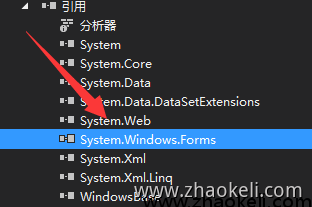
然后保存下面代码为AnkHotKey.cs
using System;
using System.Windows;
using System.Windows.Forms;
using System.Collections;
using System.Windows.Interop;
namespace AnkHelper
{
    class AnkHotKey
    {
        [System.Runtime.InteropServices.DllImport("user32")]
        private static extern bool RegisterHotKey(IntPtr hWnd, int id, uint controlKey, uint virtualKey);
        [System.Runtime.InteropServices.DllImport("user32")]
        private static extern bool UnregisterHotKey(IntPtr hWnd, int id);
        #region Member
        int KeyId;         //热键编号
        IntPtr Handle;     //窗体句柄
        Window Window;     //热键所在窗体
        uint ControlKey;   //热键控制键
        uint Key;          //热键主键
        public delegate void OnHotKeyEventHandler();         //热键事件委托
        public event OnHotKeyEventHandler OnHotKey = null;   //热键事件
        static Hashtable KeyPair = new Hashtable();          //热键哈希表
        private const int WM_HOTKEY = 0x0312;                // 热键消息编号
        public enum KeyFlags                                 //控制键编码
        {
            MOD_ALT = 0x1,
            MOD_CONTROL = 0x2,
            MOD_SHIFT = 0x4,
            MOD_WIN = 0x8
        }
        #endregion
        ///<summary>
        /// 构造函数
        ///</summary>
        ///<param name="win">注册窗体</param>
        ///<param name="control">控制键</param>
        ///<param name="key">主键</param>
        public AnkHotKey(Window win, AnkHotKey.KeyFlags control, Keys key)
        {
            Handle = new WindowInteropHelper(win).Handle;
            Window = win;
            ControlKey = (uint)control;
            Key = (uint)key;
            KeyId = (int)ControlKey + (int)Key * 10;
            if (AnkHotKey.KeyPair.ContainsKey(KeyId))
            {
                throw new Exception("热键已经被注册!");
            }
            //注册热键
            if (false == AnkHotKey.RegisterHotKey(Handle, KeyId, ControlKey, Key))
            {
                throw new Exception("热键注册失败!");
            }
            //消息挂钩只能连接一次!!
            if (AnkHotKey.KeyPair.Count == 0)
            {
                if (false == InstallHotKeyHook(this))
                {
                    throw new Exception("消息挂钩连接失败!");
                }
            }
            //添加这个热键索引
            AnkHotKey.KeyPair.Add(KeyId, this);
        }
        //析构函数,解除热键
        ~AnkHotKey()
        {
            AnkHotKey.UnregisterHotKey(Handle, KeyId);
        }
        #region core
        //安装热键处理挂钩
        static private bool InstallHotKeyHook(AnkHotKey hk)
        {
            if (hk.Window == null || hk.Handle == IntPtr.Zero)
            {
                return false;
            }
            //获得消息源
            System.Windows.Interop.HwndSource source = System.Windows.Interop.HwndSource.FromHwnd(hk.Handle);
            if (source == null)
            {
                return false;
            }
            //挂接事件
            source.AddHook(AnkHotKey.HotKeyHook);
            return true;
        }
        //热键处理过程
        static private IntPtr HotKeyHook(IntPtr hwnd, int msg, IntPtr wParam, IntPtr lParam, ref bool handled)
        {
            if (msg == WM_HOTKEY)
            {
                AnkHotKey hk = (AnkHotKey)AnkHotKey.KeyPair[(int)wParam];
                if (hk.OnHotKey != null)
                {
                    hk.OnHotKey();
                }
            }
            return IntPtr.Zero;
        }
        #endregion
    }
}
使用方法如下
private AnkHotKey hk;
private void Window_Loaded(object sender, RoutedEventArgs e)
{
    hk = new AnkHotKey(this, AnkHotKey.KeyFlags.MOD_ALT, System.Windows.Forms.Keys.F1);
    hk.OnHotKey += new AnkHotKey.OnHotKeyEventHandler(() =>
    {
        System.Windows.MessageBox.Show("热键单击");
    });
}
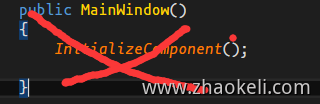
注意:如上所示代码要加在窗口加载完成后注册才可以,不能加到如下代码部分,直接报错。因为窗口句柄还没有分配出来